Price your next tender from your own past estimates.
RFQ Copilot reads the buyer's request, finds similar work in your past estimates and supplier offers, and drafts the quote with a source behind every price. The final call is always yours.
Already have an account? Sign in →
- Prices only from your sources
- A source behind every price
- Nothing is sent without you
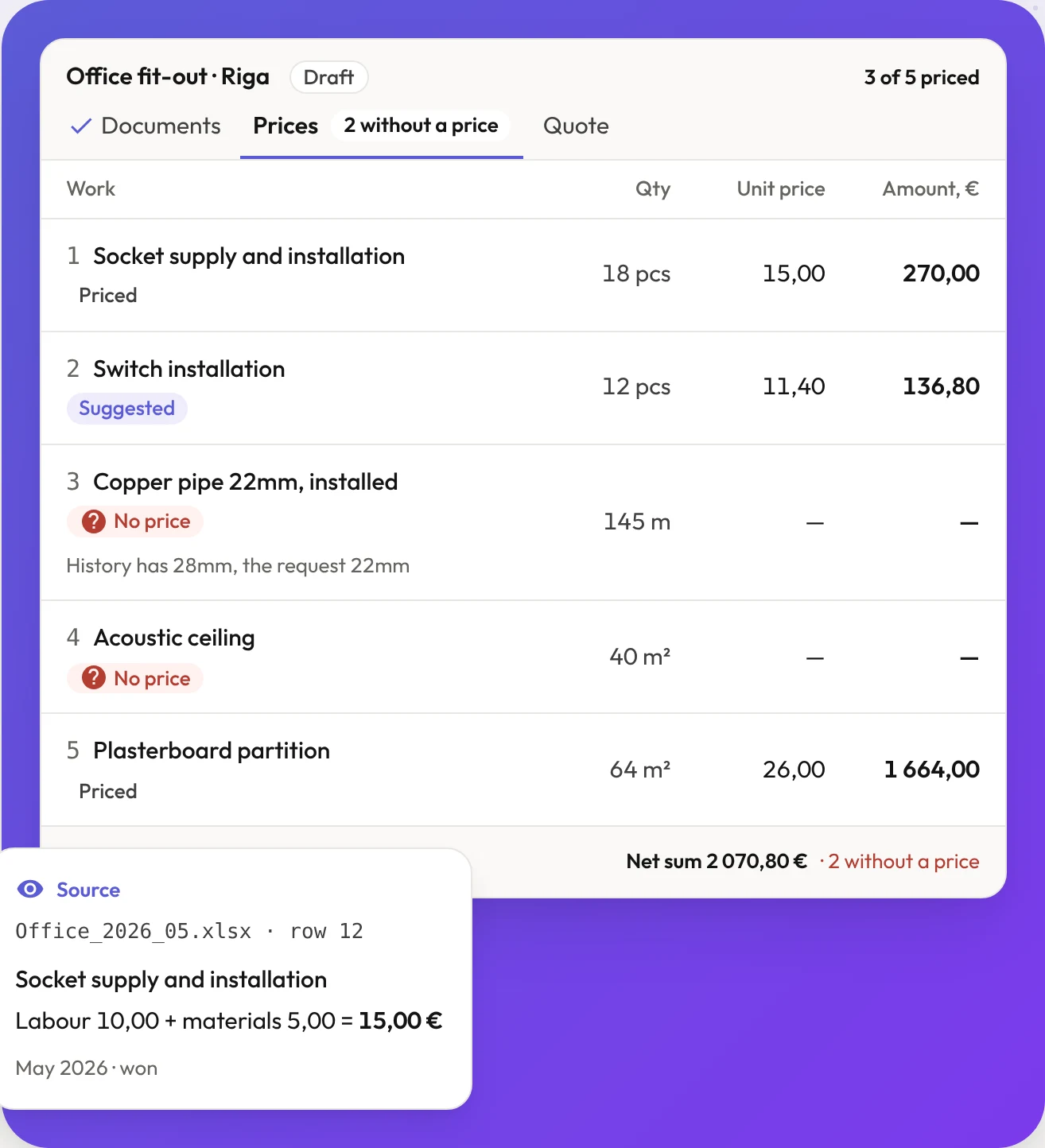
The experience is already in your files. Finding it is the slow part.
Today
- Searching old estimates and folders for similar work
- Copying prices and converting units by hand
- Not seeing which job and year a price came from
- Noticing missing prices at the last minute
With RFQ Copilot
- Similar positions found in your own history
- Units, sizes and dates checked against the request
- The file, row and date behind every price
- Missing prices visible early, while there is time to ask a supplier
From the buyer's documents to a quote you have checked.
Add your past estimates
Excel, PDF or Word. Positions and prices are read out; you confirm what to reuse.
Upload the request
Drop in the buyer's files. Work, quantities, deadline and terms are read out at once.
Review the prices
Each price shows its source and every difference is marked. Ask the assistant what is still open.
Download the quote
A Latvian Excel or PDF, or the buyer's own form filled in, ready for your review.
Similar wording is not enough.
The request needs 22mm copper pipe. Your history has 28mm, so that price is not applied. A supplier offers 22mm material, but a material price is not your installed selling price. RFQ Copilot shows both and leaves the decision to you.
Try the five-step demo ↗
What RFQ Copilot never does
- Invent a price
- Without a source, the price stays empty.
- Turn a missing price into zero
- The total shows what is known and what is still open.
- Send anything on your behalf
- You review the document and send it yourself.
- Mix a material cost with a selling price
- Supplier offers and quoted prices stay distinct evidence.
Your documents stay in your company's workspace.
- Invitation only
- Nobody can open an account on their own. Your administrator decides who signs in.
- One company, one workspace
- Your estimates, prices and requests are visible only to your company's accounts.
- On your own server, if you prefer
- RFQ Copilot can also be installed on your company's own server or cloud account.
- Not used for training
- Microsoft Azure AI Foundry reads your documents in an EU data centre. Your documents do not leave the EU, and neither we nor Microsoft use them to train AI models.
Questions before you start
- Does it make up prices?
- No. Prices come from your own history, supplier evidence or an estimator's input. Missing evidence stays missing.
- Does a supplier price become my selling price?
- No. Material costs and historical quoted prices are different evidence. You decide the final quote price.
- Will it send a quote for me?
- No. You review and export the document. Sending remains a human action.
- Which AI reads my documents?
- Microsoft Azure AI Foundry, in a data centre in the EU. Your documents do not leave the EU and are never used to train AI models. The privacy policy has the details.
- How is this different from the Quotes & proposals service?
- It is the same approach, built as a ready product for construction subcontractors. If you price something other than construction work, we build the system around your own price lists and templates instead.
Let's walk through your estimating workflow.
Accounts are opened by invitation. Send a request and we reply by email to arrange a walkthrough. If you like, bring one typical estimate and one request to look at together.